
Monday, December 15GNOME IT SOLUTIONS LLC

Tag: linux

Install cPanel & WHM on AlmaLinux 8/9 (Fresh Server Guide)

Install cPanel & WHM on AlmaLinux 8/9 (Fresh Server Guide)

cPanel, GNOME LATEST POST
Step-by-Step: Install cPanel & WHM on a Fresh Server These steps assume: OS: AlmaLinux 8 / 9 (or other supported RHEL-like) Fresh server (no control panel installed) Root SSH access Step 1: Login as root ssh root@your_server_ip If you’re logged in as a sudo user: sudo -i Step 2: Set a hostname cPanel requires a FQDN (like server.yourdomain.com): hostnamectl set-hostname server.yourdomain.com Also add it in /etc/hosts: nano /etc/hosts Add a line like: your_server_ip server.yourdomain.com server Save & exit. Step 3: Update the system yum update -y or on newer: dnf update -y Reboot if kernel updated: reboot Reconnect SSH. Step 4: Disable NetworkManager (if required) On some setups cPan...

How to Back Up Proxmox to NAS (Step-by-Step Complete Guide)

How to Back Up Proxmox to NAS (Step-by-Step Complete Guide)

GNOME LATEST POST, Proxmox
Backing up your Proxmox VE server to a NAS (Network Attached Storage) is essential for data protection, disaster recovery, and business continuity. This guide explains multiple reliable methods to back up Proxmox VMs, containers, and configuration files to a NAS—without using images, making it ideal for documentation or clean blog publishing. Why Back Up Proxmox to a NAS? Centralized storage for backups Protection against host failure Easy restore to same or another Proxmox node Cost-effective compared to cloud backups Works with NFS, SMB/CIFS, or iSCSI Supported NAS Protocols in Proxmox Proxmox supports the following NAS types: NFS (Recommended) SMB / CIFS iSCSI (advanced use) Proxmox Backup Server (PBS) (best option if available) Met...
How to Migrate VM from VMware ESXi to Proxmox VE (Step-by-Step Guide)

How to Migrate VM from VMware ESXi to Proxmox VE (Step-by-Step Guide)

GNOME LATEST POST, Proxmox
Migrating virtual machines from VMware ESXi to Proxmox VE is common when switching to an open-source, subscription-free virtualization platform. This guide explains the cleanest and safest migration method using OVF/OVA and qcow2 conversion. Prerequisites Before starting, ensure: ✅ Administrator access to ESXi & Proxmox✅ VM is powered OFF✅ Enough disk space on Proxmox✅ Proxmox ISO storage ready✅ SSH access to Proxmox 🧱 Architecture Overview ESXi VM → OVA/OVF → Disk Conversion → Proxmox VM Step 1: Power Off VM & Export from ESXi Login to ESXi Host Client Right-click the VM → Power → Shut Down Click Actions → Export You will get: .ova (single file) OR .ovf + .vmdk 📂 Step 2: Upload Files to Proxmox Upload the export...
How to install mcrypt for PHP 7.2 and PHP 7.3 on Centos 7(cPanel)

How to install mcrypt for PHP 7.2 and PHP 7.3 on Centos 7(cPanel)

centos, cPanel
how easy it is to install mcyrpt for PHP 7.2 and PHP 7.3 via Pecl for Easy Apache4 on Centos 7(cPanel). PHP officially deprecated mcrypt as of PHP 7.1 and this causes issues for sites whos CMS still requires it but want to run later PHP versions. More about that official notice is here. Mcrypt installation process Install epel-release repoInstall libmycrpt and libmcrypt-devel rpms needed for the PHP extensions.Update all Pecl php versions.Install Mcrypt PHP extensions via Pecl for PHP72 and PHP73Restart Apache/Litespeed to activate the extensions Install epel-release repo if you do not already have it installed yum install epel-release Install libmycrpt and libmcrypt-devel rpms needed for the PHP extensions. yum install libmcrypt libmcrypt-devel Update all Pecl php ...
Proxmox Cloud-Init OS template creation

Proxmox Cloud-Init OS template creation

GNOME LATEST POST, Proxmox
In this guide we will go over creating a Proxmox KVM Template from a Cloud Image. This same process will work for any Cloud-Init Openstack based image type you can find online. Having done a number of these for our Proxmox based VPS service I wanted to post up a guide to help anyone else looking to do the same thing. My workflow for customizing one of those for use with Proxmox with cloud-init deployment from WHMCS and root login is below. Once you setup one template you can rapidly reinstall new containers and test stuff. Setup Environment If not installed already installed you will need libguestfs-tools : apt-get install libguestfs-tools To edit the image before importing. We will use virt-edit which is a part of libguestfs-tools. For the sake of s...
How to add storage to Proxmox

How to add storage to Proxmox

Proxmox
Using an HDD for the proxmox host, the VMs and the containers was causing delays and long iowait.After upgrading to an SSD there was a spare 1TB hard drive that could be used for storing containers that write constantly big chunks of data to the hdd,something that can cause increased wear to the ssd. Since the needs are not complicated the setup is simple and does not use raid,zfs etc. After the hdd setup, an elasticsearch stack container with netflow analysis was moved to the hdd,and although the read speeds do not match the performance of the containers running from the ssd, the hdd not having anything else running has an amazing increase in data read compared to the previous setup where the proxmox host and the VMs were based on the same hdd.This tutorial covers the following subj...
How to Enable exec() in PHP-FPM (Safe Step-by-Step Guide)

How to Enable exec() in PHP-FPM (Safe Step-by-Step Guide)

centos, Other Linux, Ubuntu
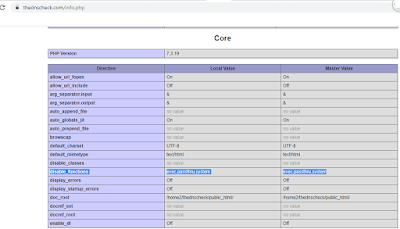
Sometimes the exec() function is not working after turning on the PHP-FPM and in php configuration file we could not find any disable functions. If we turned off the PHP-FPM the exec function is working again. If you are facing such issues, please follow the below steps. First, you need to verify the PHP-FPM is enabled on the domain that facing the issue. Please follow the steps. 1) Login to WHM. 2) Navigate to MultiPHP Manager to check whether the domain is using PHP-FPM or not. 3) From that page, you can verify that the domain is using PHP-FPM. Now you have verified that PHP-FPM is on the server. So you need to follow the steps to enable exec() in PHP-FPM. 1) Login to server via SSH. 2) Check the PHP version of the server using the below command. #php -v 3)...
Install Taskwarrior on Ubuntu and CentOS (Terminal-Based Todo App)

Install Taskwarrior on Ubuntu and CentOS (Terminal-Based Todo App)

centos, Ubuntu
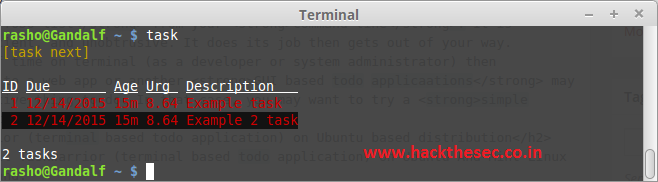
Taskwarrior is Free and Open Source Software that manages your TODO list from your command line. It is flexible, fast, efficient, and unobtrusive. It does its job then gets out of your way.If you spend a lot of time on terminal (as a developer or system administrator) then constantly switching to a web app or another GUI based todo applications may not be a very productive thing to do. In that case, you may want to try a simple command line application instead.Ubuntu based distribution If you want to install Taskwarrior (terminal based todo application) on Ubuntu And Mint Linux enter following command: $ sudo apt-get install todo -y Centos based distributionTo install taskwarrior on CentOS 6.x/7.x first enable epel repository and type following command: $ sudo yum install epel-rel...