Monday, August 10GNOME IT SOLUTIONS LLC

Tag: nas

Add NFS Storage to Proxmox VE (Step-by-Step Guide)

Add NFS Storage to Proxmox VE (Step-by-Step Guide)

Proxmox
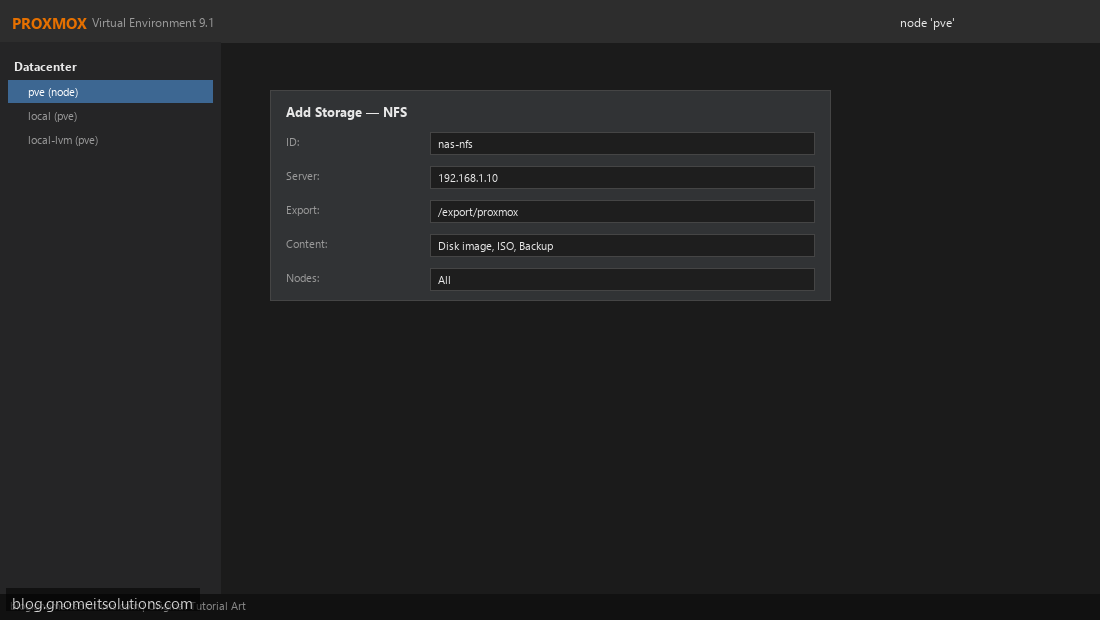
Add NFS storage to Proxmox to store VM disks, ISOs, and backups on your NAS. Step 1: Review Current Storage Datacenter → Storage. Review existing pools before adding NFS. Current storage list Step 2: Add NFS Storage Click Add → NFS. Enter server IP, export path, and content types. Add NFS storage dialog Step 3: Verify NFS Storage Active Confirm nas-nfs shows Active status and correct usage. NFS storage active pvesm add nfs nas-store --server 192.168.1.10 --export /export/proxmox Image credits: All screenshots are original Proxmox VE 9.1-style illustrations created for Gnome IT Solutions. Each image matches its tutorial step. Not copied from third-party sources. Image credits: Screenshots are from the official Proxmox VE documentation (Proxmox GmbH), used under open documentation terms...