Live Migrate VM Between Proxmox Nodes (Step-by-Step)
Proxmox live migration moves a running VM between cluster nodes with no downtime.
Step 1: Verify Cluster Nodes Online
Datacenter → Cluster. Confirm all nodes show online status.
Cluster nodes online
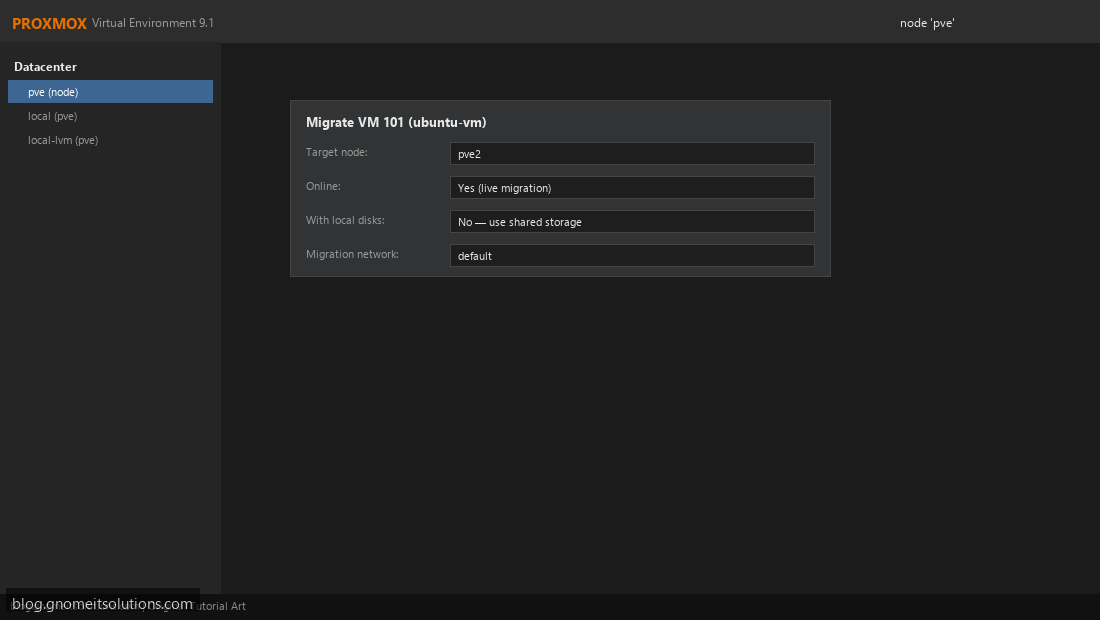
Step 2: Open Migrate Dialog
Right-click running VM → Migrate. Select target node and enable online migration.
VM migrate dialog
Step 3: Confirm Shared Storage
VM disks must be on storage visible to both nodes (NFS, Ceph, iSCSI).
Shared storage for migration
qm migrate 101 pve2 --online
Image credits: All screenshots are original Proxmox VE 9.1-style illustrations
created for Gnome IT Solutions. Each image matches its tutorial step. Not copied from third-party sources.
Image credits: Screenshots are from the official
Proxmox VE documentation
(Proxmox GmbH), used under open documentation ter...