Proxmox Cluster Setup: Multi-Node Configuration Guide
Set up a multi-node Proxmox cluster for centralized management, live migration, and high availability.
Requirements
2+ Proxmox nodes with static IPsPorts 8006, 5404-5405 open between nodesUnique hostnames per node
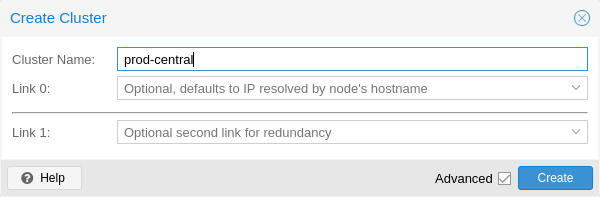
Step 1: Create a New Cluster
Datacenter → Cluster → Create. Enter cluster name and link IP.
Create cluster on first node
Step 2: Join Cluster — Enter Information
On additional nodes: Cluster → Join. Enter peer IP and credentials.
Join cluster — peer information
Step 3: Complete Cluster Join
Confirm fingerprint and join the node to the existing cluster.
Join cluster confirmation
CLI Alternative
pvecm create pve-cluster
pvecm add 192.168.1.51
pvecm status
Best Practices
Use 3+ nodes for reliable quorumUse shared storage for HA migration
Image credits: Screenshots are from the ...