Our Traefik guide covered automatic routing and HTTPS for a single service version. This guide covers what happens when you need to release a new version safely — two established strategies, blue-green (instant full cutover between two complete environments) and canary (gradual traffic shift to the new version), both implementable using Traefik’s weighted service routing without any extra infrastructure.
Step 1: The Problem Both Strategies Solve
A naive deploy — stop the old container, start the new one — causes a brief outage and offers no easy way back if the new version is broken except deploying the old one again from scratch. Both blue-green and canary keep the old version running alongside the new one during the transition, giving you zero downtime and an instant rollback path (just route traffic back).
Step 2: Blue-Green — the Concept
Blue is the currently live version; green is the new version, deployed fully but receiving no traffic yet. Once green is verified healthy (smoke tests, manual check), traffic cuts over entirely and instantly from blue to green. If something’s wrong, cutting back to blue is just as instant — the old version never stopped running.
Step 3: Implementing Blue-Green With Traefik
Run both versions as separate Docker Compose services (app-blue, app-green) with distinct Traefik router labels, but only the currently active one’s router enabled — cutover means updating labels (or a router priority rule) and running docker compose up -d to apply, pointing Traefik’s single public router at the newly active service.
Step 4: Canary — the Concept
Instead of an instant all-or-nothing cutover, canary sends a small percentage of traffic (e.g. 10%) to the new version while the rest continues hitting the old one, gradually increasing the new version’s share as confidence grows. This catches problems that only appear under real production traffic, affecting a limited slice of users instead of everyone at once.
Step 5: Implementing Canary With Traefik’s Weighted Service
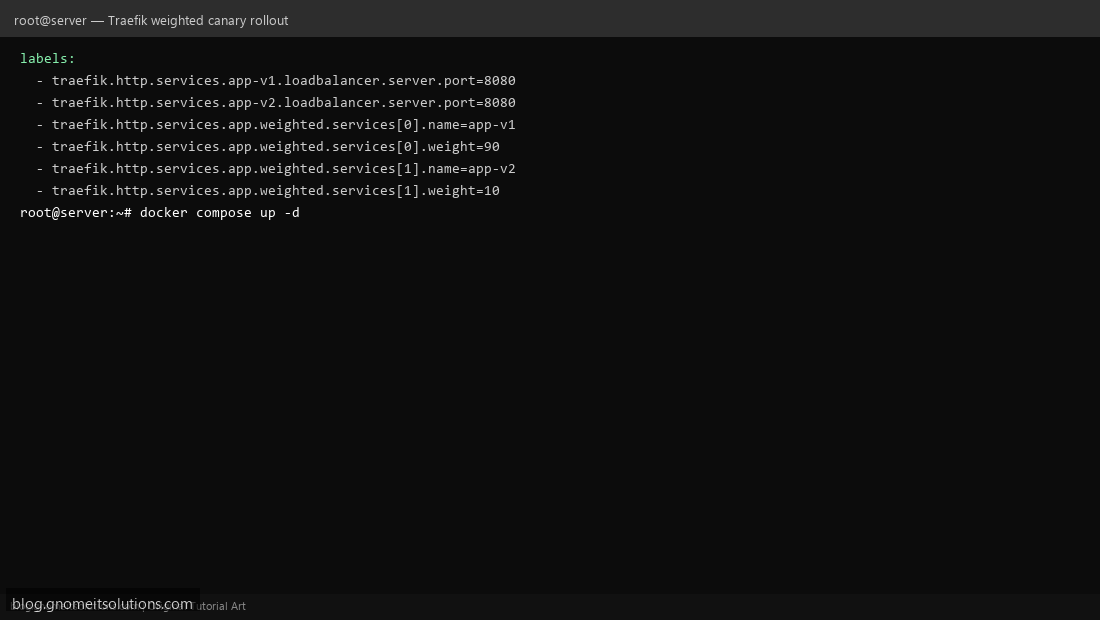
Traefik supports a weighted round robin service that splits traffic by percentage across multiple backend services: label config defining traefik.http.services.app.weighted.services[0].name=app-v1 with weight=90 and a second entry for app-v2 with weight=10 sends roughly 10% of requests to the new version — adjust the weights over time as you gain confidence.
Step 6: Monitor During the Rollout
A canary rollout is only as good as your ability to detect a problem in the small traffic slice — watch error rates and latency specifically for the new version using our Prometheus + Grafana stack, and check application logs for the new version specifically via our Loki setup — an issue hiding in 10% of traffic can be invisible in an aggregate dashboard that mixes both versions together.
Step 7: Rollback for Each Strategy
Blue-green rollback: flip the router back to the previous version’s labels — instant, since it never stopped running. Canary rollback: set the new version’s weight back to 0 — traffic drains away from it immediately without needing to change anything about the routing structure itself, since both versions were always in the same weighted service definition.
Step 8: Choosing Between Them
Blue-green fits changes you’re fairly confident about but still want an instant rollback safety net for — a same-behavior version bump, a config change. Canary fits changes with real uncertainty about production behavior — a significant code change, a new dependency, anything you specifically want to validate against real traffic before fully committing. Nothing stops combining them: canary to validate, then blue-green-style full cutover once confidence is high.
Example canary Traefik labels
services:
  app-v1:
    image: myapp:1.0
    labels:
      - traefik.http.services.app-v1.loadbalancer.server.port=8080
  app-v2:
    image: myapp:2.0
    labels:
      - traefik.http.services.app-v2.loadbalancer.server.port=8080
      - traefik.http.services.app.weighted.services[0].name=app-v1
      - traefik.http.services.app.weighted.services[0].weight=90
      - traefik.http.services.app.weighted.services[1].name=app-v2
      - traefik.http.services.app.weighted.services[1].weight=10
Related tutorials
Terminal screenshots are original illustrations created for Gnome IT Solutions (blog.gnomeitsolutions.com).