Our Terraform on Proxmox guide covers getting infrastructure-as-code working — this guide covers catching security mistakes in that same code before terraform apply ever runs, not after a misconfigured resource is already live. tfsec and Checkov are both static analyzers purpose-built for Terraform, each with a slightly different rule set — running both catches more than either alone.
Step 1: Why Scan IaC Before It’s Applied
A misconfigured Terraform resource — an open security group, a storage bucket without encryption, a hardcoded credential in a variable default — becomes a real security gap the moment apply runs, not something you find later during an audit. Scanning the plan/code itself catches these before any real infrastructure is affected, the IaC equivalent of a code review specifically for security properties.
Step 2: Install tfsec
Install via the official script or your package manager: curl -s https://raw.githubusercontent.com/aquasecurity/tfsec/master/scripts/install_linux.sh | bash. Confirm with tfsec --version. No cloud credentials or network access needed — tfsec analyzes the Terraform source files statically.
Step 3: Run tfsec Against a Project
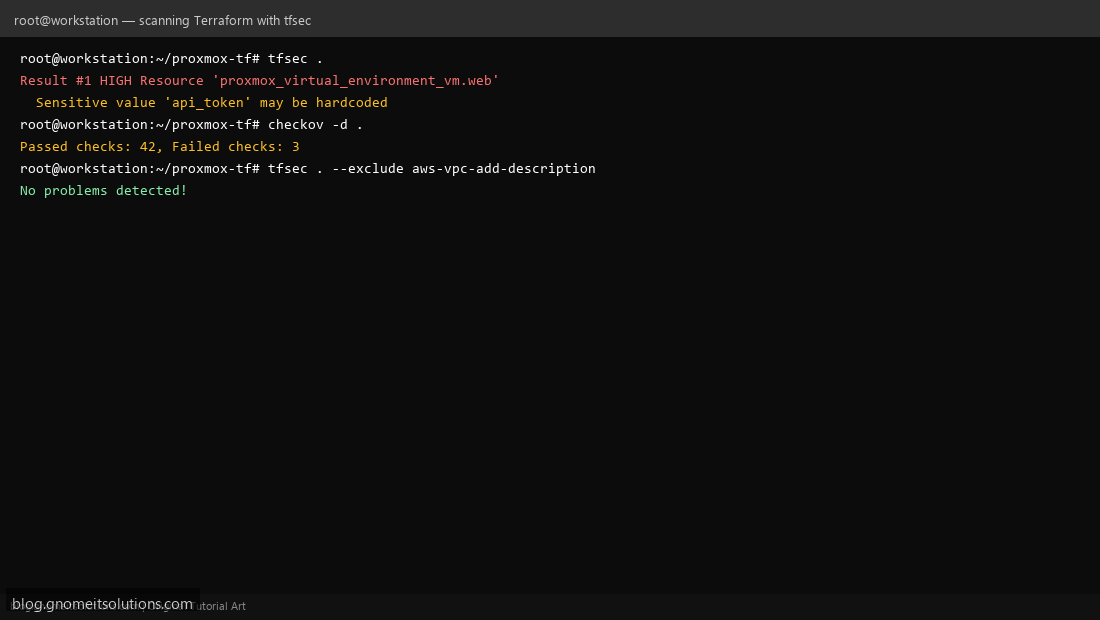
From your Terraform project directory: tfsec .. Output lists each finding with a severity, the affected resource, and a description — for example, flagging a Proxmox API token variable that looks hardcoded rather than sourced from a sensitive variable or environment variable, the same pattern our Terraform guide specifically warned against.
Step 4: Understand Severity Levels and Common Findings
Findings range from LOW (a missing description tag) to CRITICAL (a genuinely dangerous misconfiguration). Common recurring categories: secrets that appear hardcoded rather than variable-sourced, resources missing encryption settings, and network rules open more broadly than necessary. Triage by severity first — a project with dozens of LOW findings and zero HIGH/CRITICAL ones is in much better shape than the count alone suggests.
Step 5: Run Checkov as a Second Opinion
pip install checkov, then checkov -d . against the same project. Checkov’s rule set overlaps with tfsec’s but isn’t identical, and it also covers other IaC formats (CloudFormation, Kubernetes manifests, Dockerfiles) if your stack extends beyond Terraform — worth running both rather than picking one and assuming full coverage.
Step 6: Suppress a Documented Exception
Not every finding needs to block a merge — some are false positives for your specific context, or accepted risks with a business reason. tfsec supports inline suppression comments directly above the resource (#tfsec:ignore:general-secrets-sensitive-in-variable) — keep these specific to one rule and one resource, with a comment explaining why, rather than suppressing broadly.
Step 7: Gate CI on Scan Results
Add both scanners as a required pipeline stage before terraform plan or apply ever runs — tfsec . --exclude aws-vpc-add-description style commands exit non-zero on unsuppressed findings above your chosen severity, which a CI pipeline can treat as a hard gate the same way our Trivy CI/CD guide gates on container vulnerabilities.
Step 8: Apply This to the Proxmox Terraform Pipeline
Run tfsec and Checkov against the exact Terraform project from our Proxmox provisioning guide — confirm the API token variable is properly marked sensitive, that no cloud-init user-data blocks embed plaintext passwords, and that state file handling doesn’t accidentally commit sensitive output to a public repo.
Command reference
# tfsec
tfsec .
tfsec . --exclude aws-vpc-add-description

# Checkov
pip install checkov
checkov -d .

# Inline suppression
#tfsec:ignore:general-secrets-sensitive-in-variable
Related tutorials
Terminal screenshots are original illustrations created for Gnome IT Solutions (blog.gnomeitsolutions.com).