An API key or database password committed to a Git repo — even briefly, even in a private repo — is effectively compromised the moment it’s pushed: it exists in every clone, every fork, and the full commit history forever unless that history is explicitly rewritten. Deleting the file in a later commit does not remove the secret — it’s still sitting in the history, one git log -p away from anyone with repo access. Gitleaks scans for exactly this pattern, both proactively (before a commit happens) and forensically (across full history).
Step 1: Understand Why This Keeps Happening
Secrets end up in Git the same few ways every time: a config file with real credentials committed during local testing and never removed, a debug print statement that logs a token, or a .env file that should have been gitignored but wasn’t added to .gitignore before the first commit. None of these are exotic mistakes — they’re routine, which is exactly why automated scanning matters more than “just be careful.”
Step 2: Install Gitleaks
Download the appropriate binary from gitleaks’ GitHub releases, or install via your package manager if available. Confirm with gitleaks version. No server component needed — it’s a single binary that operates directly on a local Git repository.
Step 3: Scan the Repository’s Current State
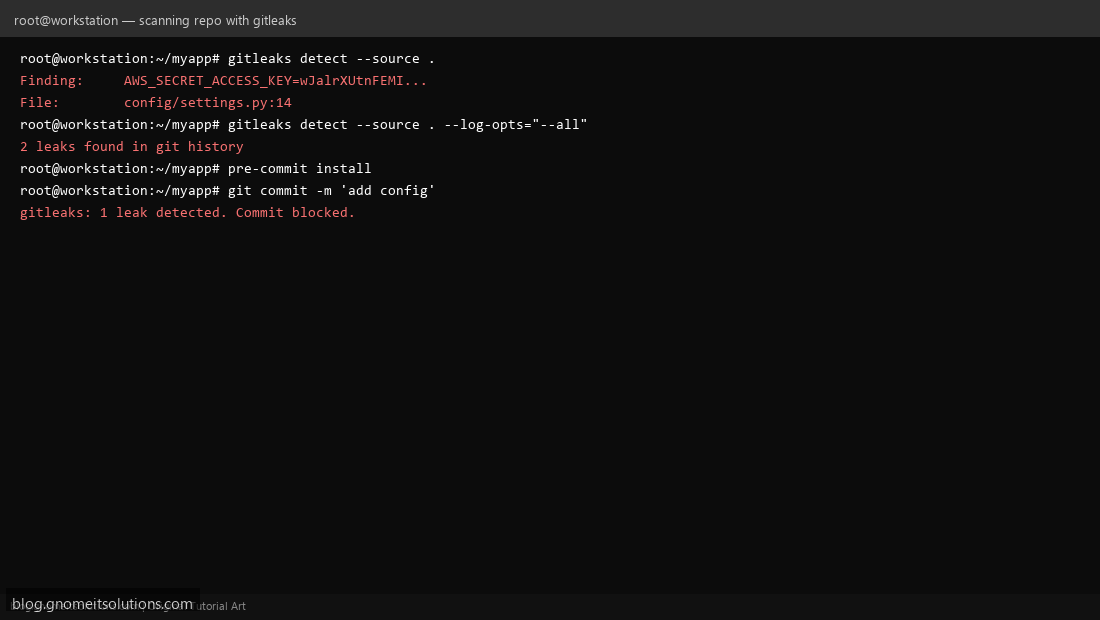
gitleaks detect --source . run from inside a repo checks the currently-checked-out files for patterns matching known secret formats (AWS keys, private keys, generic high-entropy strings assigned to suspiciously named variables). Each finding shows the matched pattern, the file, and the line number.
Step 4: Scan the Full Git History
A clean current state doesn’t mean a clean history — a secret added and later deleted is still findable. gitleaks detect --source . --log-opts="--all" scans every commit in the repo’s history, not just the current checkout. This is the scan that actually matters for an existing repo you didn’t originally set this up on from day one.
Step 5: Block Secrets Before They’re Committed
Prevention beats detection: install the pre-commit framework (pip install pre-commit), add a gitleaks hook to .pre-commit-config.yaml, and run pre-commit install. Now every git commit attempt runs gitleaks against the staged changes first — a detected secret blocks the commit locally, before it ever reaches a remote repository at all.
Step 6: Enforce It in CI Too
Pre-commit hooks are locally installed and can be skipped (--no-verify) or simply not set up on a contributor’s machine — treat them as a courtesy, not a guarantee. Add the same gitleaks scan as a required CI pipeline step (in your GitLab CI or Jenkins pipeline) that fails the build on any detection — this is the check that can’t be bypassed by a missing local setup.
Step 7: Respond Correctly to a Real Find
If gitleaks finds a genuine live secret already committed: rotate the credential immediately — assume it’s compromised the moment it was pushed, regardless of whether the repo is private. Only after rotation does cleaning the history (with git filter-repo or BFG Repo-Cleaner) matter — rewriting history without rotating the actual credential first accomplishes nothing, since the old value is still valid until you change it at the source.
Step 8: Tune False Positives
High-entropy string detectors occasionally flag legitimate non-secret values (a hashed test fixture, a random-looking but public ID). Add a .gitleaks.toml allowlist with specific regex patterns or file paths to exclude, rather than disabling the scan entirely for a whole file — keep the exclusion as narrow as the actual false positive.
Command reference
# Scan current state
gitleaks detect --source .

# Scan full history
gitleaks detect --source . --log-opts="--all"

# Pre-commit hook (.pre-commit-config.yaml)
repos:
  - repo: https://github.com/gitleaks/gitleaks
    rev: v8.18.0
    hooks:
      - id: gitleaks
Related tutorials
Terminal screenshots are original illustrations created for Gnome IT Solutions (blog.gnomeitsolutions.com).