
Answering Machine Detection (AMD) tries to tell a live human answer apart from a
voicemail greeting in the first second or two of a call, so predictive dialing campaigns can drop machine
answers instead of connecting them to an agent. Get it too aggressive and you drop real people who paused
before speaking; too conservative and agents waste time listening to voicemail greetings.
This guide covers ViciDial’s detection engine options, the timing parameters that actually drive
accuracy, and how to test and tune a campaign’s settings against real call patterns.
Step 1: Understand the Detection Trade-Off
AMD works by analyzing the audio pattern right after a call connects — a live person typically says something short (“Hello?”) followed by silence waiting for a response, while a voicemail greeting is usually longer and continuous. There is no perfect detector: every AMD engine trades false positives (a real person misdetected as a machine and dropped) against false negatives (a machine misdetected as human, wasting an agent’s time).

Step 2: Choose a Detection Type
ViciDial exposes several detection engines under the campaign’s Detection settings: standard Asterisk AMD, ViciDial’s own AMD implementation, and OFF-Adaptive Analog variants that adjust thresholds based on ongoing call statistics rather than fixed values. Adaptive modes generally perform better over time on a given calling pattern, but need a volume of real calls to actually adapt — don’t judge them from the first few test calls.
Step 3: Set Detection Amplitude
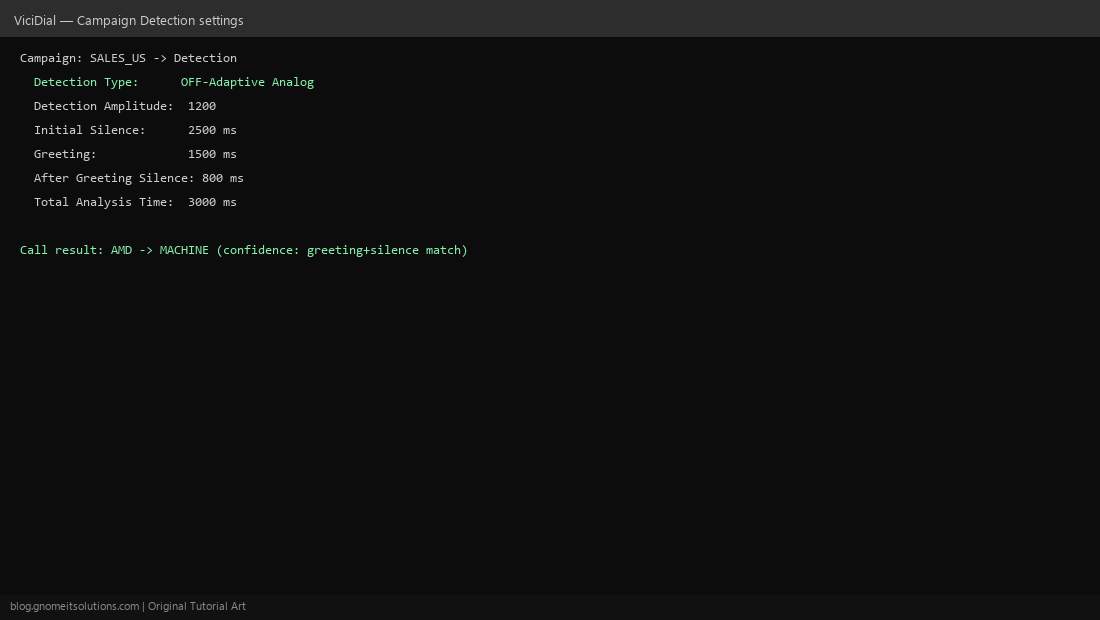
Detection Amplitude is the audio energy threshold used to distinguish speech from silence — too low and background noise gets misread as speech; too high and quiet speakers get misread as silence. Start from the campaign default and adjust in small increments while monitoring actual detection results, not on a hunch — this value interacts with your specific carrier’s audio levels and codec, which varies between setups.
Step 4: Tune the Timing Parameters
Four timing values drive most of AMD’s behavior: Initial Silence (how long to wait for any sound before giving up), Greeting (maximum length of continuous speech still counted as a greeting/answer), After Greeting Silence (a pause following speech, more voicemail-like), and Total Analysis Time (the hard cutoff after which AMD makes its final call regardless of what it’s seen).
Step 5: Decide What Happens on a MACHINE Result
Campaign settings control the action when AMD flags a call as a machine: hang up immediately, play a pre-recorded voicemail drop message, or route to a separate voicemail-handling extension. A voicemail drop can be a compliance minefield depending on your jurisdiction and industry — confirm your message content and opt-out language are compliant before enabling it broadly.
Step 6: Test Against Real Call Patterns
Load a small test list mixing known live-answer numbers and known voicemail numbers, run a short campaign session, and review the resulting dispositions against what you know actually happened on each call. This is the only way to catch a misconfigured amplitude or timing value — synthetic test tones don’t reproduce real carrier audio quality and background noise.
Step 7: Monitor Ongoing Accuracy
AMD accuracy isn’t a one-time setting — carrier routes, area code mixes, and even seasonal call patterns shift over time. Periodically sample a set of calls dispositioned as MACHINE and confirm agents agree with a subset flagged HUMAN, adjusting timing parameters if you notice a drift in either direction.
Step 8: Balance Aggressiveness Against Compliance Risk
Aggressive AMD settings reduce wasted agent time but increase the rate of real people being dropped without a live agent ever picking up — which some jurisdictions regulate directly as an abandoned-call metric with its own compliance thresholds. Tune for a detection accuracy your compliance requirements can tolerate, not purely for maximum agent efficiency.
Quick reference
- Detection Type — engine choice (standard, ViciDial AMD, OFF-Adaptive)
- Detection Amplitude — speech vs silence energy threshold
- Initial Silence / Greeting / After Greeting Silence / Total Analysis Time — the four core timing knobs
Related tutorials
Image credits: All illustrations are original terminal/config mockups created for
Gnome IT Solutions — not screenshots from any third-party site. Tutorial text © Gnome IT Solutions.